Review of DoenetML VSCode Extension
DoenetML VSCode Extension
Each new user of a new system uncovers a new class of bugs.
— Brian Kernighan, co-author of the first book on C programming language.
If you haven’t checked it out already, I highly recommend looking up Distributed Open Education Network (Doenet), currently in beta, for creating accessible, interactive content and activities for students. While it can be used for any subject, the initial development has focused on mathematics as it is being developed by mathematicians under an NSF grant at the University of Minnesota, led by Duane Nykamp.
Recently, a VSCode Extension for DoenetML became available. I’ve been aware of it for a few weeks, but with getting things ready for the Doenet Community Workshop, finding time to sit down and play with it was difficult. I finally got around to it as part of my final push to update my Calculus II notes and activities for the Fall 2026 semester — perfect timing, as I had a large library of activities I already maintain in VSCode and GitHub to be remotely fetched by my obsidian-doenet Plugin into my notes. This gave me a good number of files to quickly test the plugin on. You can see a few samples on my teaching page.
Full disclosure: I have been on and off involved with the Doenet development team since I was a postdoc at University of Minnesota from 2020–2022, I serve on the Advisory Board for the ongoing language development, and I am one of the editors for its curated activity collection.
Conclusion/tl;dr
This is a great addition to the OER DoenetML Development ecosystem. Unfortunately if you adopt it now, you’ll be getting a version with a great many bugs and frustrations built-in, although some of the feature set is quite useful. I’ll be using it in a limited capacity for just a few tasks around my workflow (particularly minor edits to my course activities with code-completion and “Pretty Code” auto-formatting). It is also useful for local development, but I already have offline live-previewing of activities in my obsidian-doenet Plugin for embedding DoenetML activities into markdown.
So based on the current state of the plugin, I’d suggest that unless you want to be an early adopter to help identify and squash issues as a contribution to the project, I’d stick to developing through the web interface on beta.doenet.org. I’ll probably use a mixture of the two, but due to the inconsistent error/problem identification between the two code validators, I’m going to stick with the web-interface for now and likely be opening a lot of GitHub issues as the VSCode validator throws errors at me.
You can read the details below if you’re interested in what specifically led me to these conclusions.
The Pros
Immediately there are several nice features that become available for any .doenet file in your workspace once the extension is enabled.
Live Previewing
Useful, but this is already built in to Doenet’s online editor and my obsidian-doenet plugin, so it’s a “nice” feature, but based on the cons noted below, I don’t see VSCode becoming my primary editor. For very small activities (check your work boxes with short/simple answers) I’ll just write them in my markdown directly, and for complicated activities I’ll be using the web interface for initial development and debugging. I can see this being useful for making small edits to an activity already living locally or on GitHub and checking that you didn’t break it.
Syntax Highlighting and Autocompletion
Again, useful for quick edits and debugging. Appears to work well, similar to the web-interface, although autocompletion is likely the feature I spent the least time testing.
Dark Mode Support
This is a big one for developers, as the website is blindingly bright with limited access to change formatting. Currently the website does not have any support for dark mode/themes. This isn’t explicitly listed in WCAG 2.2 AA standards, but supporting light and dark themes based on a user’s system preferences is a key component of web accessibility and usability. Strictly speaking, the legal requirement is currently 2.1 AA standards, but 2.2 is backwards compatible so I strive to make everything meet the more modern standard.
Looking up some additional information on Dark Mode Design recently, I found that even websites devoted to best practices in Dark Mode can fail to meet accessibility standards themselves while extolling the importance of accessibility — so it’s non-trivial that the VSCode extension for DoenetML is striving to design a dark-mode UI for Doenet. (If you’re curious what I mean, view the linked page’s Strategic AEO Summary in Dark Mode, which currently falls well below the required contrast threshhold!)
I can attest, designing two fully compliant, harmonious designs for UI is a big lift. I just recently finished redesigning both this website and my course notes to be fully WCAG 2.2 AA compliant. I will write a blog post on lessons learned from this process in the near future. In the meantime, you can view my sample Calculus II course materials in both light and dark mode over on my teaching page, including the DoenetML activity UIs, all of which should meet WCAG 2.2 AA compliance. Let me know if you find anything that doesn’t!
I do feel like we need to de-duplicate efforts here, so hopefully whoever is doing this on the Doenet Dev team and I can touch base soon, possibly as part of the Accessibility Team for Doenet. Ideally we could start fixing the Doenet website (which fails these standards currently), the development environment, and the end-user experience.
Pretty Code
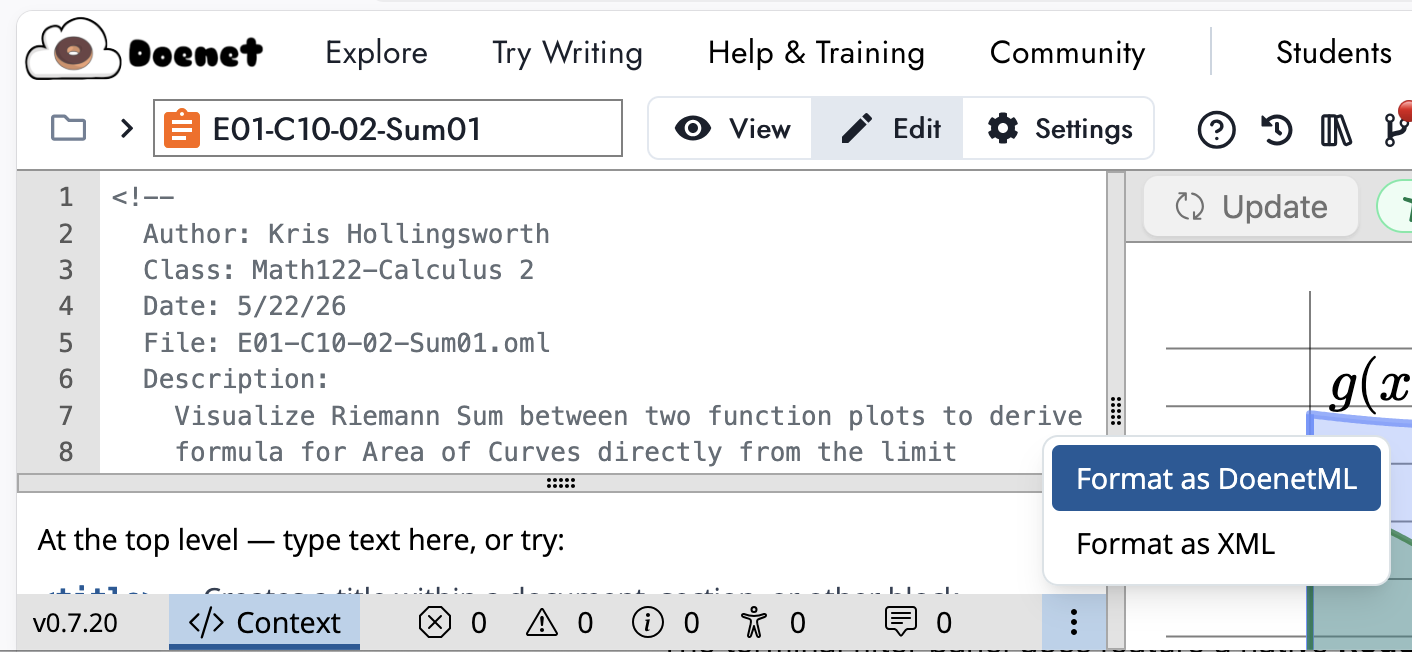
To me, this is one of the best features, as I often make numerous minor edits and remixes of activities directly in VSCode. I went looking for a web equivalent after seeing it in the VSCode extension, and lo and behold, it’s there too — accessible from the vertical “3-dots” footer menu button at the bottom of the editor view.
The Cons
Most of the problems stem from the fact that the VSCode Extension is still in early development, and DoenetML itself is in beta and constantly changing. That said, here are a few frustrations I had on the first pass through.
Custom File Extensions
Supposedly there is already custom extension mapping supported by the plugin, but it does not appear to be working when I try and use the context menu to access it following the instructions in the Plugin Documentation.
It’s easy enough to fix this locally in VSCode though.
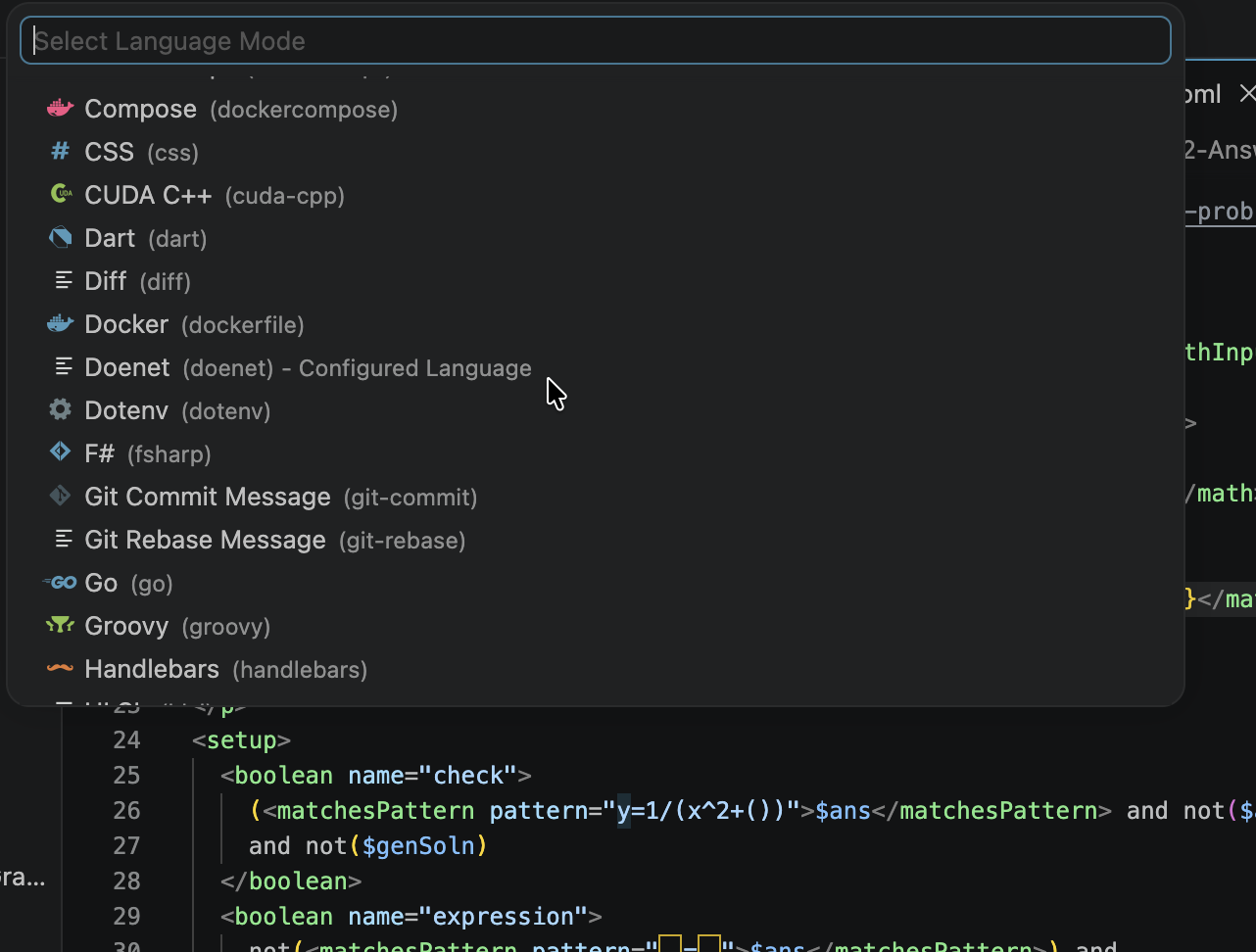
Workaround 1, use built-in configuration tools.
- Open a file with the extension you would like associated with Doenet.
- Press
cmd + kon Mac orctrl+kon Windows.- Press
m.- If the DoenetML extension is installed, you should have a “doenet” as an option (pictured)
Workaround 2, add mapping to settings.json directly
By default, the extension looks for
*.doenetfiles to associate with DoenetML. However, (and this is a hill I will die on), I prefer the*.omlas my pattern, as the (little doughnut character)ML also maintains a three-character extension pattern that doesn’t overlap with any pre-existing common file extensions. You can register this in VSCode by adding"files.associations": { "*.oml": "doenet" }to your
settings.jsonfile.
Many false positives for problems
The first issue is that syntax checking for custom <module> attributes creates false-positives. As one of the primary users of modules, I’m not surprised that this is one of the first things I noticed that hadn’t already been reported. I tried several more complicated work-arounds, including trying to dig into the DoenetML Schema (which will eventually be the correct fix), or look into modifying the DoenetML Extension to allow for custom schema additions. I even tried to write a small VS-Code Extension to remove the extraneous warnings, but unfortunately it turns out VSCode doesn’t allow you to remove Problems from another extension, so this would require intercepting all messages. Doable, but not worth the effort.
I was hopeful that the VSCode Extension Error Lens might succeed where I had failed. Alas, it does not, but it does provide some nice features so I’ll be keeping this plugin (immediately useful, problems show up to the right on the same line now, not just in the separate pane. This makes resolving specific issues much easier, as well as spotting them if you’re not paying as much attention to the debugging tools.)
All that said, you can manually filter these out with !module in the filter of the Problems pane to remove all error messages involving modules.
I also got additional errors on <boolean> tags which the editor on the DoenetML website did not flag and behaved correctly. So either the VSCode editor is more strict (possible) or it is enforcing false constraints not implemented in DoenetML. It does appear likely that the VSCode extension is simply more strict towards coding best practices, even if they do not impact the output or functionality of the code. This might be useful, but it feels similar to getting my website up to WCAG 2.2 AA standards, the final items are often inconsequential to the actual rendered output, functionality, or even accessibility concerns, and are falling at the level of pedantry of automated checkers which are not evaluating against the real standards. Obviously Doenet is a small team, so some level of technical debt is expected, but the mismatch between the extension and the online interface here is particularly striking in code validation.
Still some parsing issues in the auto-formatting
Overall, the auto-formatting worked great, but I had a few unusual patterns that caused it problems. In particular, I had opening comment tags inside comments:
<!--
<!--
<!-- -->
I often do this for multiline block comments, so I can see each line which is part of the comment immediately. It should ignore everything until it first parses a --> tag, which many code validators and linters handle (the online editor also handles this well, although the VSCode Extension does not). Really, the inconsistencies like this between the online editor and the VSCode Extension are what will prevent me from relying on the extension much at this time.
There were also several instances where one blank line multiplied. I couldn’t find a consistent pattern for it, so I won’t be submitting a GitHub issue on that at this time. But I will submit one for nested opening comment tags noted here.